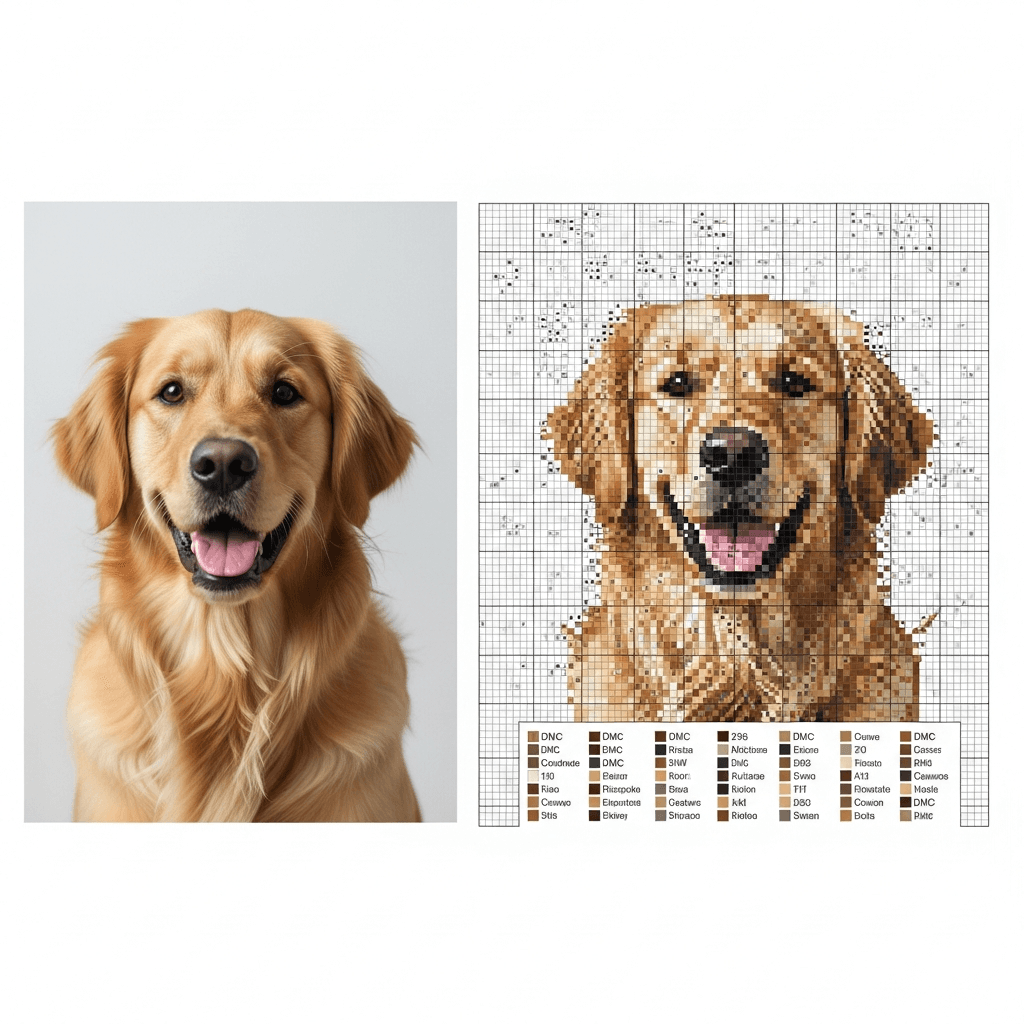
If you want a pet portrait cross stitch pattern that actually looks like your dog or cat, start with a tight photo, not a sentimental one. Then make three decisions early: how wide the chart should be, how many colors you will allow, and how much confetti you are willing to stitch. Get those three right and the pattern usually works. Get them wrong and you end up with muddy fur, a weird background, and 40 hours of thread changes you did not need.
That is worth getting right because pet portraits are not some tiny niche. According to APPA's 2025 State of the Industry Report, 94 million U.S. households owned at least one pet in 2024, including 68 million dog-owning households and 49 million cat-owning households (APPA). People want these patterns because they care about the subject. Which also means a bad conversion feels personal.
Here is the setup I would use for most first drafts:
| If you are making... | Start here |
|---|---|
| Small framed gift | 110-130 stitches wide, 14-18 colors |
| One-pet portrait with good detail | 140-180 stitches wide, 18-30 colors |
| Large realistic portrait | 180-240 stitches wide, 30-45 colors |
Then test from there. Not the other way around.
What makes a good pet photo for a cross stitch pattern?
A good source photo does more work than any software setting.
Simple Cross Stitch's photo-to-pattern guide gets the basics right: crop to the subject, simplify the background, add a little contrast, and avoid tiny faces. May Flaum said the same thing after stitching a dog portrait from a DMC conversion. The white-background photo worked much better than the outdoor versions because it was less distracting (Craft With May).
For pet portraits, that means:
- Use one pet, not three.
- Crop from the ears to the chest unless the pose is the whole point.
- Pick a photo where the eyes are visible and the muzzle is in focus.
- Kill the background if it is grass, furniture, or shadow soup.
If the best photo you have is emotionally perfect but technically messy, fix it before you chart it. Brighten the eyes. Raise the contrast a little. Remove the clutter. Cross stitch is brutally honest about bad inputs.
How big should a pet portrait cross stitch pattern be?
Bigger is not always better. Bigger is just more stitches.
Thread Bare makes the point well: a 200 x 160 design is already 32,000 stitches, and viewers will not study the finished piece from six inches away the way you do while stitching it (Thread Bare). That is the right mindset for pet portraits. You are not trying to recreate every hair. You are trying to keep the face recognizable from normal viewing distance.
For a single dog or cat head-and-shoulders portrait, I would start here:
| Chart width | Best use | Rough finished width on 14-count | Rough finished width on 18-count |
|---|---|---|---|
| 120 stitches | Small frame, tight face crop | 8.6 in | 6.7 in |
| 150 stitches | Best default for one pet | 10.7 in | 8.3 in |
| 180 stitches | More realism, more work | 12.9 in | 10 in |
DMC's Aida guide says the count is the number of stitches per inch, which is why the same 150-stitch pattern lands at different sizes on 14-count and 18-count fabric (DMC).
My default is 140 to 160 stitches wide for one pet. That is big enough to keep the eyes, nose, and ear shapes honest, but still small enough to finish in human time.
How many colors do you need in a pet portrait cross stitch pattern?
Usually fewer than you think.
Thread Bare says 30 to 70 colors can look great for photo-based patterns, but they also point out that too many single-stitch colors are a warning sign that you have gone too far (Thread Bare). Simple Cross Stitch puts the tradeoff more bluntly: 20 to 40 colors gives smoother shading, while 40 to 60 often gets confetti-heavy (Simple Cross Stitch).
That lines up with what stitchers actually share. In one r/CrossStitch pet portrait thread, the finished piece used 12 colors and still had smooth blending (Reddit). In another, a realistic dog portrait used 82 colors and the stitcher described it as "a TON of confetti" (Reddit).
My rule:
- 12 to 18 colors for simplified, graphic portraits
- 18 to 30 colors for most giftable pet portraits
- 30 to 45 colors only if the face has subtle shading you really need
If the chart is small and the palette is huge, the software is probably chasing noise, not detail.
Should you use dithering for a pet portrait cross stitch pattern?
Sometimes. Not by default.
Thread Bare explains why dithering helps portraits: it alternates nearby colors to fake smoother gradients, especially in skin, sky, and other soft transitions. The downside is more speckling and a harder chart to stitch (Thread Bare). Simple Cross Stitch gives the practical version: try dithering on for photos and off for flatter art, then compare the result (Simple Cross Stitch).
For pets, I would split it like this:
- Turn dithering on when the portrait depends on soft fur shading, especially around the cheeks, chest, or forehead.
- Turn it off when the background is plain and the face already reads clearly.
- If dithering makes the chart look like static, back out fast.
The trap here is thinking "more realistic" automatically means "better pattern." It does not. A pet portrait with slightly firmer color changes but clean stitching is usually better than a hyper-dithered chart full of single stitches.
If you want to see this tradeoff up close, read what confetti in cross stitch actually means before you commit to the noisy version.
How do you keep the face recognizable?
Put the detail where people actually look.
Nobody studies the elbow fur first. They look at the eyes, nose, muzzle line, ear shape, and the light-dark contrast around the face. Those areas carry the likeness. Spend your resolution there.
This is why tight cropping matters so much. In a Reddit thread about photo-converted dog portraits, one stitcher said they had to keep tweaking width and color count to avoid a design that exploded into 182,500 stitches. Their workable version ended up around 230 stitches wide on 18-count, and they also cut out the noisy background after the conversion (Reddit).
That is the move. Keep the background boring so the face gets the stitches.
I use this checklist:
- Make sure the eyes are not lost in shadow.
- Keep one strong light-dark edge around the muzzle or forehead.
- Remove background objects that compete with the silhouette.
- Merge stray fur colors that do not change the expression.
- Zoom out before judging. If the face reads at arm's length, you are close.
This is also where DMC numbers matter more than screen color. DMC says its six-strand floss is available in 500 shades (DMC). That is a big palette, but your monitor still lies. If you are hand-correcting a pet's fur, stay disciplined about light, medium, and dark steps instead of chasing tiny on-screen differences. The DMC floss color matching guide helps when two browns look interchangeable until they are stitched.
What makes a pet portrait chart easy to stitch?
A pretty preview is not enough. The chart has to be readable.
In a Reddit discussion about good and bad patterns, experienced stitchers kept coming back to the same complaints: unnecessary confetti, symbols that are hard to tell apart, no finished-size info, and charts that are missing color or black-and-white versions (Reddit). That is real. A pet portrait can look great in mockup form and still be miserable to stitch if the pattern packet is sloppy.
A usable pet portrait pattern should include:
- clear 10-stitch grid lines
- DMC numbers instead of color blobs
- a symbol chart you can read when tired
- color and black-and-white chart views
- finished sizes for at least the common Aida counts
This is where StitchLark fits naturally. If you are designing from your own photo, it helps with the annoying part: crop the image, limit the palette, clean up isolated stitches, and export a DMC-coded chart packet with readable symbol views. That lets you focus on whether the portrait feels like your pet instead of wrestling with the setup.
What is the fastest workflow for designing a pet portrait cross stitch pattern?
Use one photo and force yourself through three clean drafts.
Do not upload 14 photos and hope the software chooses wisdom.
Here is the workflow I would use tonight:
- Pick one sharp photo with clean lighting.
- Crop tight and remove the background.
- Generate a first draft around 150 stitches wide with 20 to 24 colors.
- Generate a second draft at the same size with fewer colors.
- Generate a third draft with dithering changed, not everything else.
- Compare them zoomed out, not nose-to-screen.
- Clean the winning draft by merging stray colors and deleting useless background speckles.
That "three draft" rule matters. In the Ruby thread on r/CrossStitch, the stitcher said it took about 10 adjustments to land on the version they wanted (Reddit). That sounds about right. Good pet portraits are not one-click projects. But they also do not need 30 random settings changes at once. Change one thing. Compare. Keep moving.
Your next step is simple: pick the best pet photo on your phone, crop it to just the face and chest, and build three drafts at the same size with three different color settings. Keep the one that still looks like your dog or cat at arm's length. If you want a cleaner starting point, run it through StitchLark's photo-to-pattern tool and use how to turn a photo into a cross stitch pattern as your cleanup checklist.